
Turning paper documents into an organized institutional record
Enterprise document archiving and management for Windows

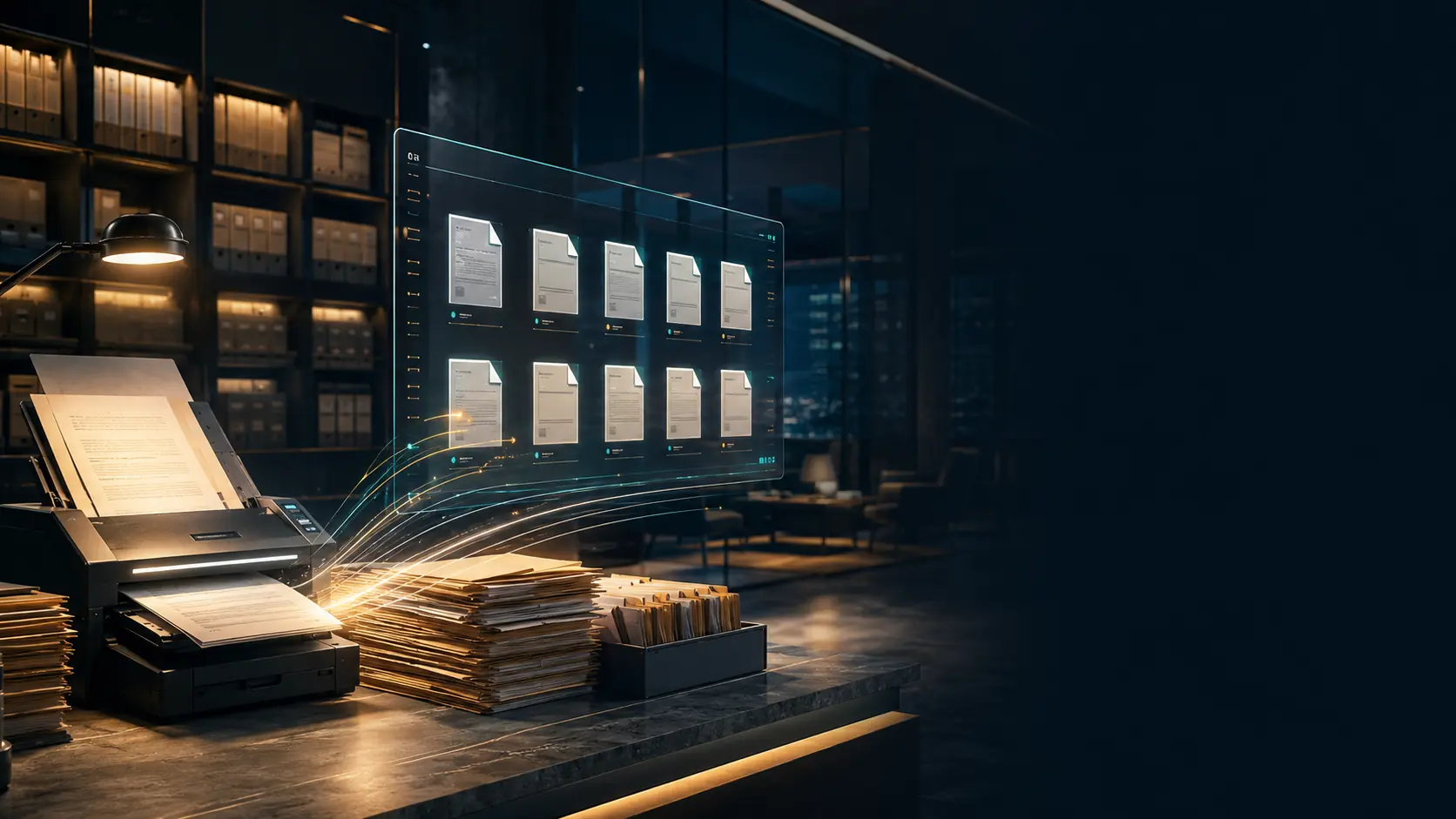
Your institution’s memory,
organized and secure.

A local-first enterprise application that combines scanning, organization, review, and archiving with data synchronization and encrypted document files across multiple devices when connected.

Works locally and syncs when connected Arabic and English interfaces Designed for institutions, businesses, and individuals
Ready for reviewA clear document workflow
Encrypted filesSync when connected
Scroll to discover the system
01Real scanningMultiple files and pages
02Connected contextRelationships, attachments, and dossiers
03Formal reviewDraft, review, then archiving
04Institutional protectionEncryption, permissions, and audit
A document is more than a file

It is a decision and context,
with a history that must stay clear.

Docxkeeper brings record data, files, activity, and relationships into one record, so a document never becomes a PDF detached from its story and responsibility.

01

A clear workflow

The document shows where it stands, what is missing, and who owns the next action.
02

Context that stays with it

Entities, tags, replies, precedents, attachments, and referrals stay connected to the record.

03

Auditable history

Creation, review, archiving, and important changes remain within a clear history.

The product at a glance

An interface that shows what work needs now.

The dashboard gives staff a direct view of documents, review states, departments, and intake activity without hiding the details behind complex menus.
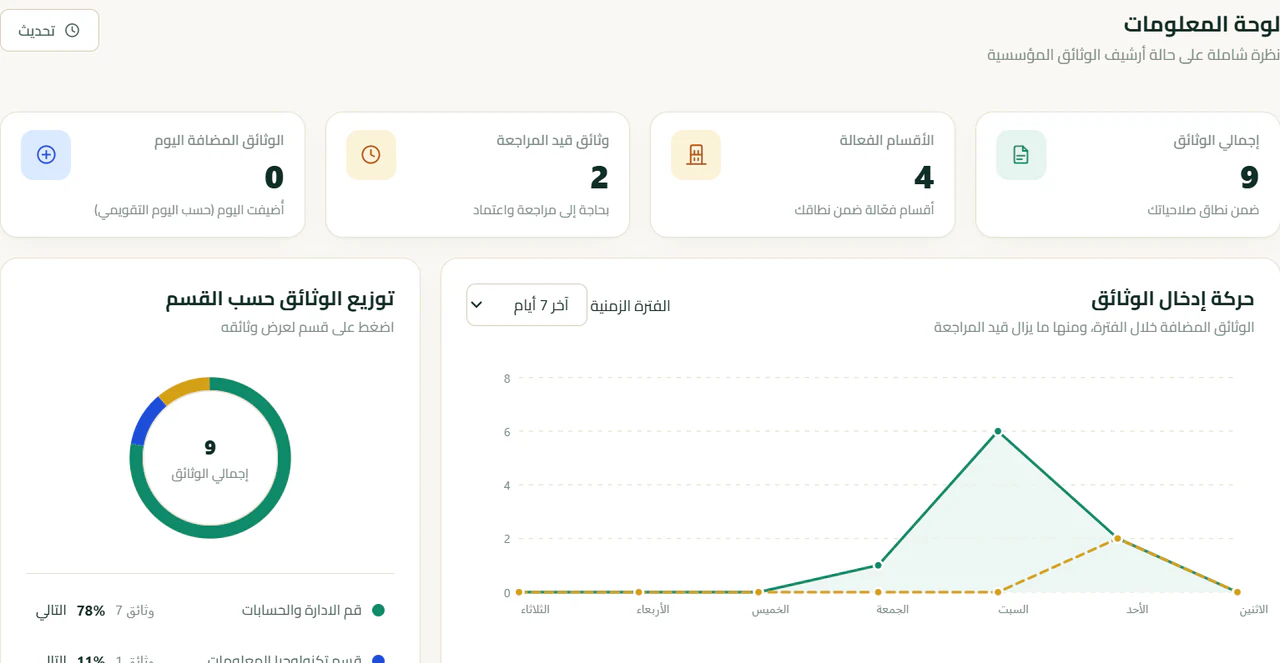
  • Immediate indicators for archive status
  • Search and filters across document data
  • Organized incoming, outgoing, and institutional numbering
Docxkeeper — Dashboard
A real screenshot of the Docxkeeper dashboard
A real screenshot from Docxkeeper's Arabic interface.
From paper to an official record

A real document lifecycle,
not a generic promise.

Work begins with a scanner or a range of digital files, then pages and record data are organized before formal review and archiving.
  1. 01Scan or addA scanner or multiple digital files.
  2. 02Organize pagesReordering and optional PDF merge.
  3. 03DraftA record that can be completed and edited.
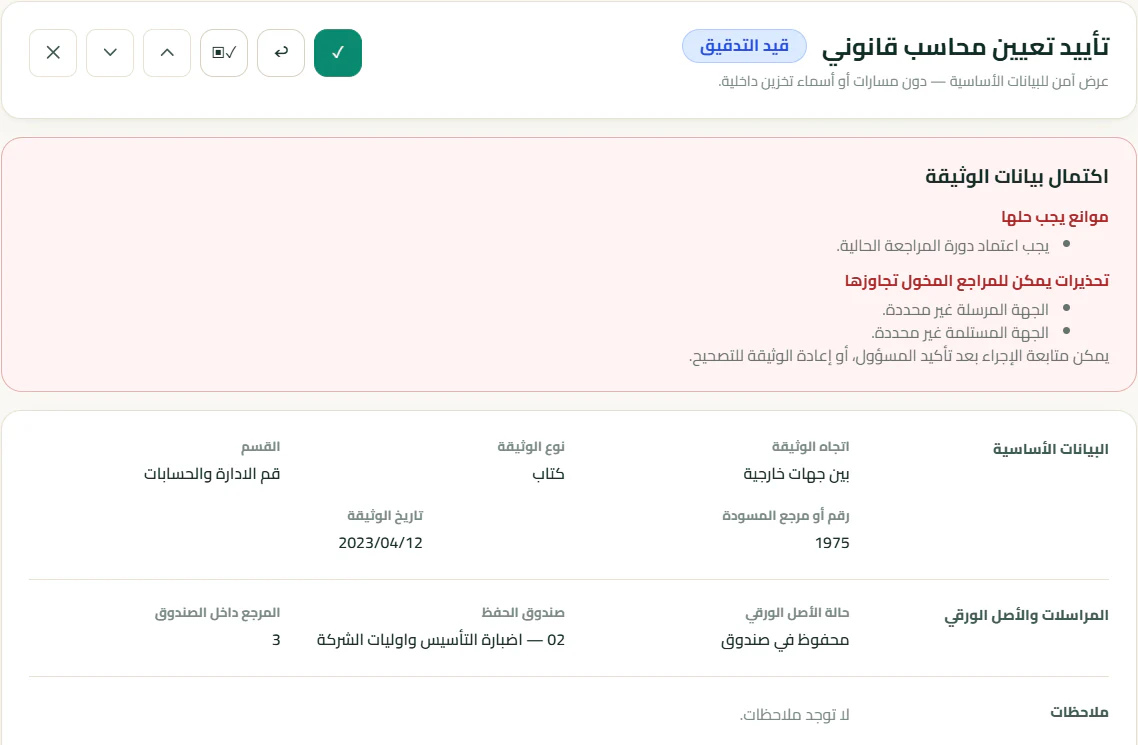
  4. 04In reviewVerification before formal approval.
  5. 05ArchivedA stable, auditable official record.
A real screenshot of document review in Docxkeeper
A real review stage showing the document state and its completion requirements.
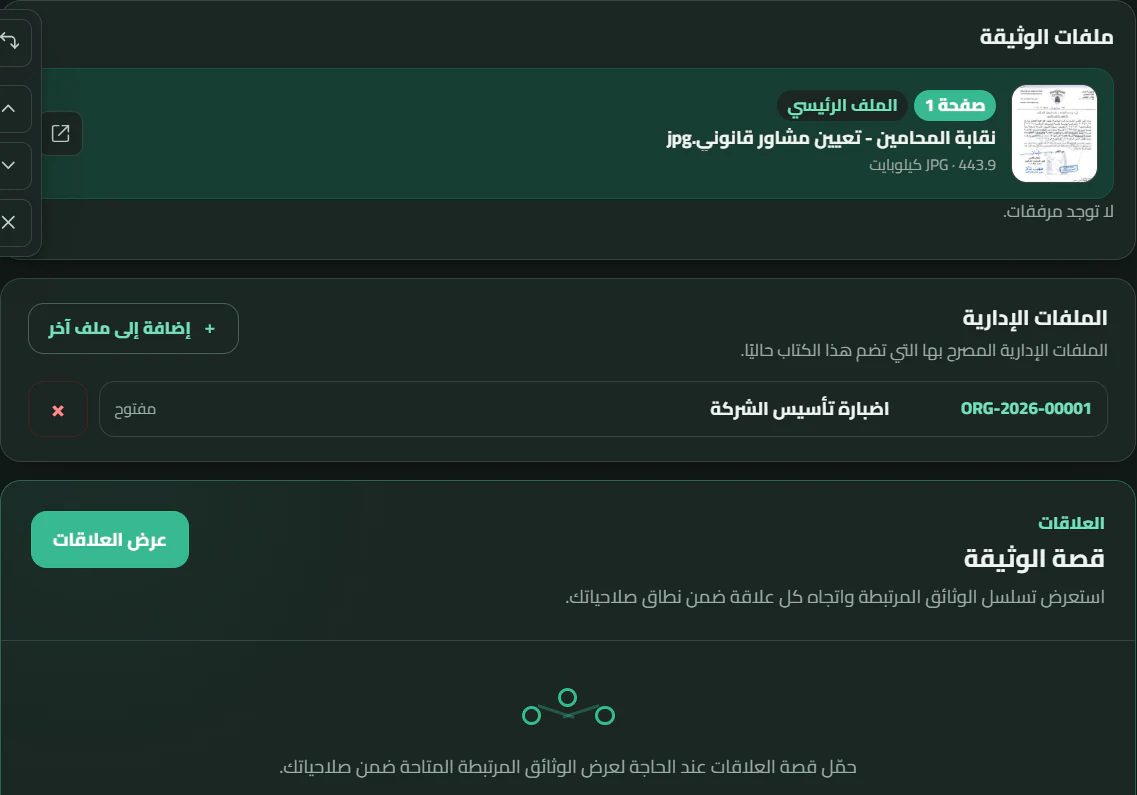
Document files, dossier, and relationships inside Docxkeeper
Every document in context

The document stays connected to its story.

Docxkeeper treats a document not as an isolated file, but as a record connected to its entity, attachments, relationships, and the workflow that gives it meaning.

Entities and tagsReplies and precedents Attachments and dossiersInternal referrals and document relationships
Document Follow-up

Archiving is not where the work ends.

Track what needs to happen next, who is responsible, when it is due, and what is still waiting for a reply.
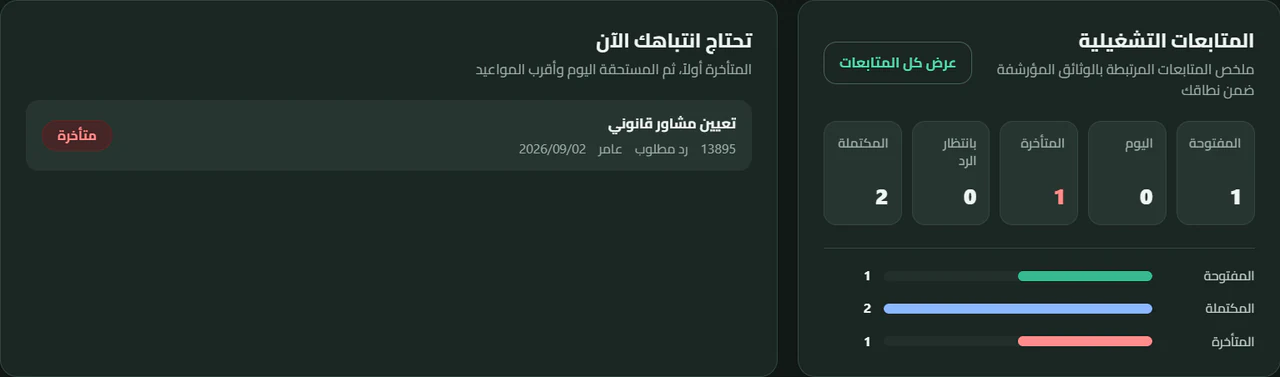
A real screenshot from the Arabic Docxkeeper dashboard showing open, due-today, overdue, and awaiting-reply follow-ups
Explore document follow-up
Work locally. Stay connected.

Work does not stop when the internet does.

Data remains on the device so the Windows application keeps working locally. When connectivity returns, Docxkeeper synchronizes changes and encrypted document files across registered devices.

  • Data synchronization and encrypted document files when connected, not a web app replacing the desktop application.
  • Multiple institutional devices, each with its own identity.
  • Conflict handling without silently overwriting changes.
  • An older device cannot restore an officially deleted record during synchronization.
01Docxkeeper DesktopLocal data and work on the device
Data and file synchronizationEncrypted document files when connected
02Registered devicesChanges and files within the institution's scope
Encryption

Protection that starts on your device and continues to the cloud

In Docxkeeper, protecting a document does not stop at a password. The local working database and the document file vault are protected by encryption, and when synchronization is used, document files stored in the cloud remain in their encrypted form.

That means practical protection in both cases: when your organization works locally with no connection, and when it links its devices through the cloud.

  • An encrypted local database: helps prevent your working data from being read directly if the database file is copied outside its approved environment.
  • A protected document vault: document files are kept inside an encrypted vault instead of sitting exposed on disk.
  • Protection that continues through sync: document files travel and are stored in the cloud in their encrypted form, so the cloud never becomes an exposed copy of them.
  • Separate keys and permissions: key protection, device identity, permissions, and the audit trail work together, rather than relying on a single barrier.

The result: your organization’s documents stay protected whether the work is local or connected, while authorized recovery remains possible when it is needed.
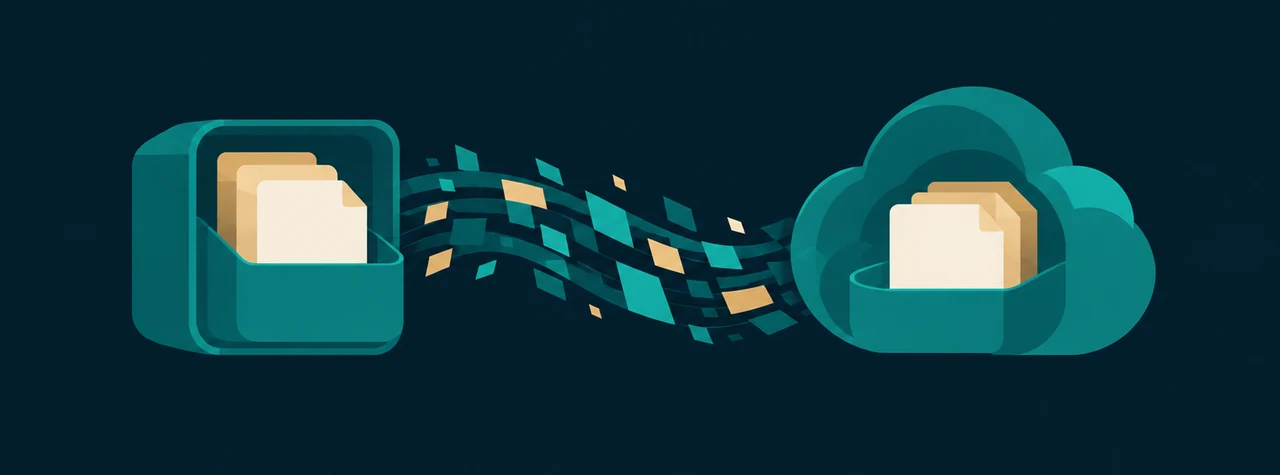
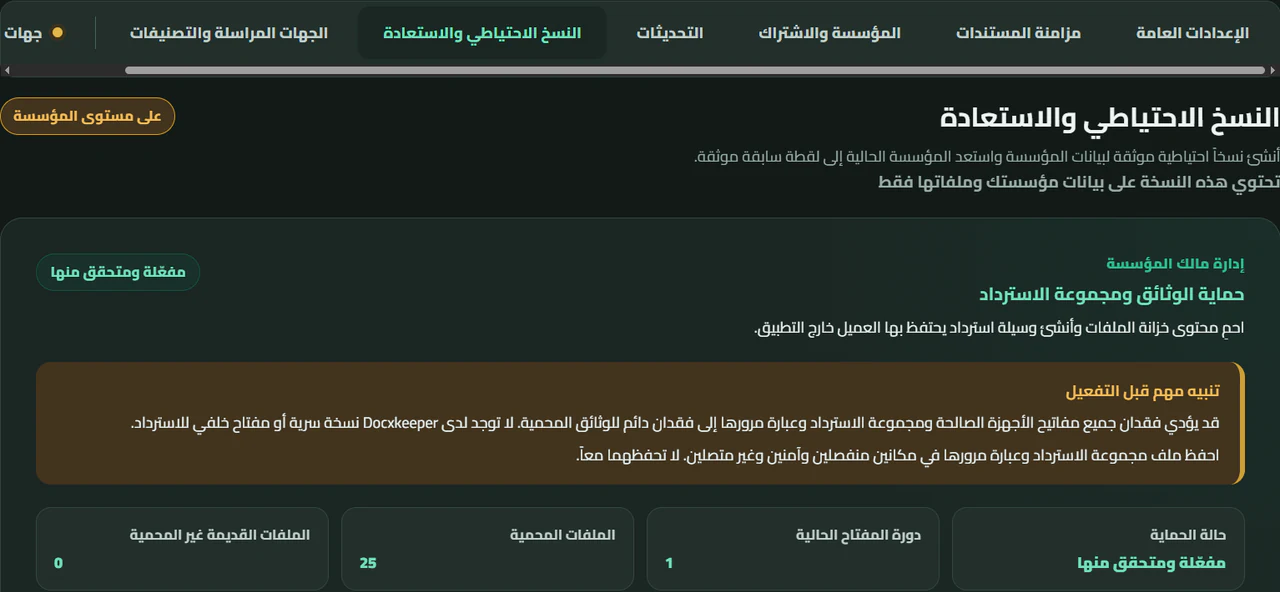
Diagram of the document protection journey: an encrypted local archive, an encrypted transfer, then a protected cloud document vault
Backup and document-file protection interface in Docxkeeper
File and device protection

Protection from the file to the access decision.

Docxkeeper protects document files, controls who can access them, and ties work to device identity and the audit trail instead of relying on a password alone.

Document-file encryptionRole- and department-based permissions A distinct identity for each deviceDevice access revocation on its next connection Audit trail and history integrityVerified application updates
From one user to a multi-department team

Give each person the access
their work requires.

Start simply, then add users and departments as the work grows. Docxkeeper combines roles, department scope, and user-level permissions so each person receives access appropriate to their responsibilities.

  • One user or a multi-department teamThe structure grows inside the same system; multi-user work is not a separate product.
  • Clear roles for the workAdministration, department management, archiving, and view-only work—without making everyone an administrator.
  • One department or severalChoose the departments a person can reach, then define what they can do within that scope.
  • User-level permissions when neededStart with a ready role, then grant or deny a specific permission for an individual user.

A user’s access can be deactivated while their work history remains attributed. Access changes reach the connected work environment during synchronization, and user identity stays separate from device identity.
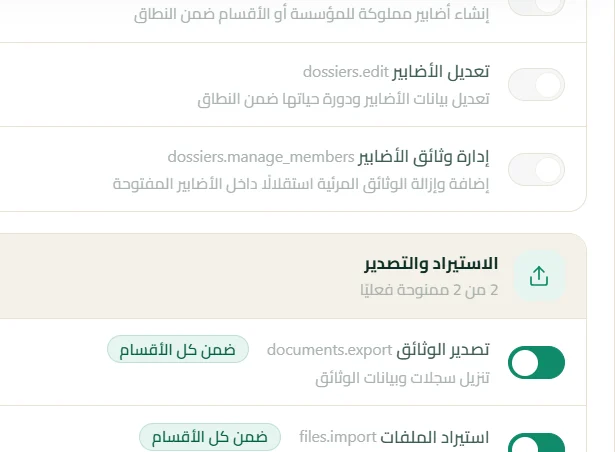
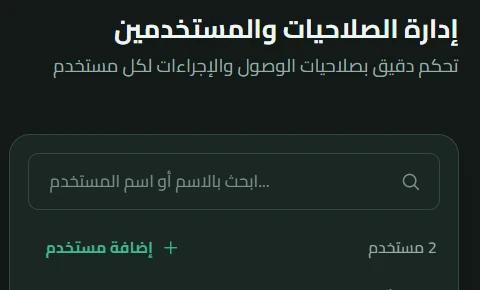
A real permission catalog showing access customization in Docxkeeper
The real permission catalog: role, department scope, and user-level customization.
Docxkeeper user management interface with personal data excluded
User management inside the application.
Everyday capabilities

Tools that shorten the path,
without crowding the employee's work.

From document intake to finding it later, the details are designed around real daily work in archives and administrative departments.
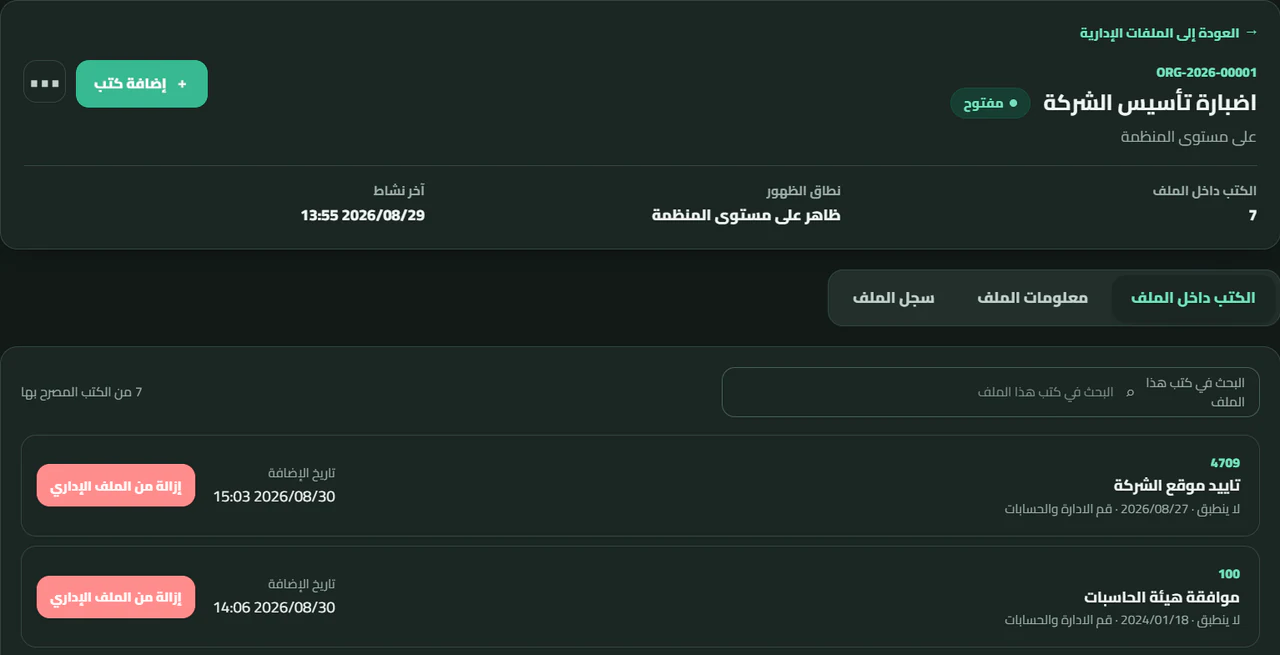
Administrative files and document search inside Docxkeeper
  • Multi-page documentsDrag and drop, paste, and page reordering.
  • In-app scannerMulti-page capture from Windows scanning devices.
  • Flexible PDFOptional page and file merging when needed.
  • Practical image editorCrop, rotate, brightness, contrast, and whitening.
  • Search Across Document DataNumber, subject, entity, date, and tags.
  • Institutional organizationIncoming, outgoing, dashboard, and numbering policies.
  • An interface for the work environmentLight mode and dark mode.
  • Two complete languagesArabic RTL and English LTR.
Experience that predates the current generation

Organizations that used Docxkeeper.

Different institutions and organizations used earlier Docxkeeper releases for local archiving. Today, Docxkeeper continues its evolution with a new generation that combines local work, synchronization, and file protection.


Iraqi Airways logo
Iraqi Airways
Iraqi Ministry of Agriculture logo
Ministry of Agriculture
Al-Azhar Private Hospital logo
Al-Azhar Private Hospital
National Insurance Company logo
National Insurance Company
General Commission of Taxes logo
General Commission of Taxes
National University for Science and Technology logo
National University for Science and Technology
Tazaj logo
Tazaj
Al-Razi Hospital logo
Al-Razi Hospital

These logos document the use of earlier releases; they do not imply use of the current synchronization service.

Designed for real institutional work

It adapts to your structure,
not the other way around.

Start with one department, then expand users, departments, permissions, and devices when the institution is ready.

Government Departments

Official letters, committees, correspondence, and administrative follow-up.

01

Companies

Contracts, correspondence, policies, and operational files.

02

Universities

Correspondence, orders, department files, and administrative records.

03

Hospitals

Administrative documents, correspondence, and interdepartmental permissions.

04

Professional offices

Contracts, work files, and correspondence in an organized archive.

05
Pricing

Choose the right plan when you are ready

Docxkeeper runs on a standalone device with a perpetual license, or on cloud plans that sync work across your organization’s devices.

Frequently Asked Questions

Clear answers,
before you begin.

What you need to know about Windows, local work, synchronization, and protection.

Have another question? Contact us
Does Docxkeeper work without the internet?

Yes. Core operations and local data remain available on the device, so work continues when connectivity is lost.

What happens when connectivity returns?

The application checks changes and synchronizes data and encrypted document files with the central service, handling conflicts instead of silently overwriting changes.

Can I use more than one device?

Yes. When synchronization is enabled, registered institutional devices can exchange changes, and each device has an independent identity whose access can be managed.

Are document files encrypted?

Yes. Docxkeeper protects document files with production encryption, and synchronized files travel in their encrypted form.

Does it run on Windows?

Yes. Docxkeeper is a Windows desktop application, and the current release package targets x64 architecture.

Does it support Arabic and English?

Yes. The application supports an Arabic RTL interface and an English LTR interface.

How do I get updates?

After installation, Docxkeeper can check for new releases and install them with your approval from inside the application.

Does it support a scanner?

Yes. It supports Windows scanning devices, multi-page capture, and page reordering and rotation before adding pages to the document.

Can I download Docxkeeper now?

Yes. The official Windows installer is available through the download page.

Contact Us

Let’s turn your needs
into a clear document workflow.

Tell us about your documents, departments, devices, and current workflow, and we will help you choose a practical starting point for your institution.

Request a Docxkeeper Trial
Emailsupport@docxkeeper.com WhatsApp+964 781 000 1080
AddressBaghdad – Al-Mansour, Iraq
Contact request

Tell us how we can help.

Fields marked with an asterisk are required.

Docxkeeper

Give your documents a system
worthy of their value.

Start on Windows, work locally, and connect when your institution needs synchronization.

30-day free trialNo payment card required.